(#1/5)
Notes:
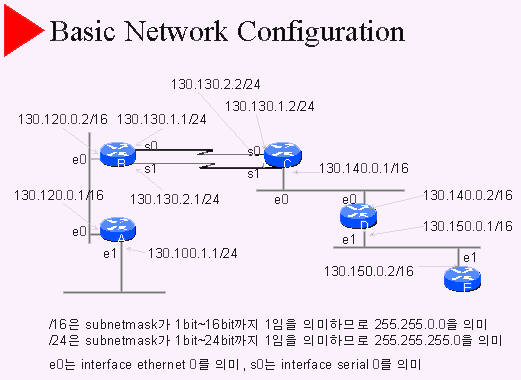
- 130.120.0.1/16이라는 것은 interface의 IP Address로 130.120.0.1을 가지며 subnetmask는 255.255.0.0을 갖는다는 것을 의미한다. 130.120.0.1은 Class B IP Address이고 Class B IP Address는 기본적으로 netmask 255.255.0.0을 가지므로, 130.120.0.0은 subnetting되지 않았다는 사실을 알수 있다.
- 130.100.1.1은 Class B IP Address이고 기본적으로 netmask 255.255.0.0을 갖는다. 130.100.1.1/24는 subnetmask로 /24 즉 255.255.255.0이므로 subnetting되었다는 사실을 알 수 있다. 130.100.1.1/24는 subnetwork 130.100.1.0/24에 속해 있는 IP Address이다.
- / 표시와 대응 netmask 예
- /8 255.0.0.0
- /9 255.128.0.0
- /18 255.192.0.0
- /24 255.255.255.0
- /27 255.255.255.224
- /28 255.255.255.240
- /29 255.255.255.248
- /30 255.255.255.252
- interface이름은 interface 형태와 몇번째 slot의 몇번째 port에 속하는 것인가를 표시하여 지정한다. 즉 어떤 serial interface가 2번째 slot의 3번째 port에 위치해 있다면 그것은 serial 1/2로 표시된다. 숫자가 1씩 적은 이유은 0에서부터 시작하기 때문이다. serial interface를 위한 serial slot이 1개 밖에 없다면 serial 2로 간단히 표시되기도 한다.
|
(#2/5)
Notes:
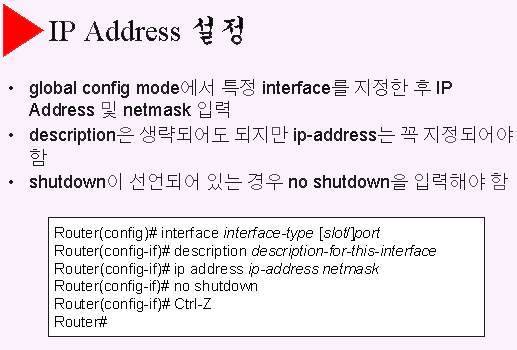
- 라우터B Interface에 대한 IP Address 설정 과정
- Router#config terminal
- Router(config)# hostname routerB
- routerB(config)# interface ethernet 0
- routerB(config-if)# ip address 130.120.0.2 255.255.0.0
- routerB(config-if)# no shutdown
- routerB(config-if)# exit
- routerB(config)# interface serial 0
- routerB(config-if)# ip address 130.130.1.1 255.255.255.0
- routerB(config-if)# no shutdown
- routerB(config-if)# exit
- routerB(config)# interface serial 1
- routerB(config-if)# ip address 130.130.2.1 255.255.255.0
- routerB(config-if)# no shutdown
- routerB(config-if)# Ctrl-Z
- routerB#
|
(#3/5)
Notes:
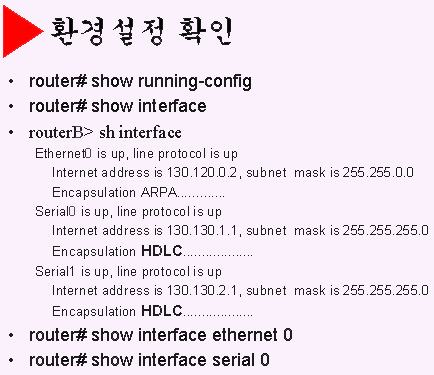
- 명령어 show는 모든 라우터의 정보를 조회할 수 있는 명령어이다.
- user mode는에서 show로 조회할 수 있는 정보는 제한되어 있다.
- 명령어 ‘show interface’는 라우터의 모든 interface에 대한 정보를 보여준다.
- ‘show interface’에 대한 출력결과를 살펴보면 interface mode에서 설정한 IP Address 및 netmask를 확인할 수 있다.
- Interface Ethernet에 대한 encapsulation은 ARPA, Interface Serial에 대한 encapsulation은 HDLC 인 것에 주목하자. 특히 Interface Serial에 대한 encapsulation은 별도로 지정해 주지 않으면 CISCO 라우터에서는 HDLC로 설정된다.
- ‘show interface’의 출력결과중 첫번째 줄이 각 Interface의 동작상태를 보여주는데 해석은 다음과 같이 할 수 있다.
- Serial0 is up, line protocol is up : 정상상태
- Serial0 is up, line protocol is down : datalink protocol 이상 (datalink protocol 점검필요)
- Serial0 is down, line protocol is down : 물리적인 inteface 이상 (연결점검필요)
|
(#4/5)
Notes:
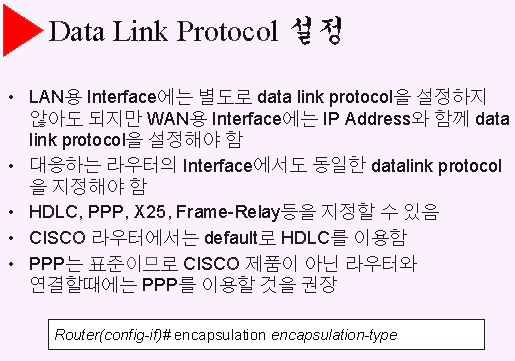
- 라우터B의 Interface Serial 0에 대한 encapsulation ppp는 다음과 같이 지정
- routerB#config terminal
- routerB(config)# interface serial 0
- routerB(config-if)# encapsulation ppp
- routerB(config-if)# Ctrl-Z
- routerB#
- 라우터 C의 Interface Serial 0에서도 동일한 encapsulation 을 지정해야 함
- routerC#config terminal
- routerC(config)# interface serial 0
- routerC(config-if)# encapsulation ppp
- routerC(config-if)# Ctrl-Z
- routerC#
- 라우터B에서 Interface Serial 0에 대한 encapsulation이 변경된 사실을 다음과 같이 확인
- routerB> show interface serial 0
Serial0 is up, line protocol is up
Internet address is 130.130.1.1, subnet mask is 255.255.255.0
Encapsulation PPP................... |
(#5/5)
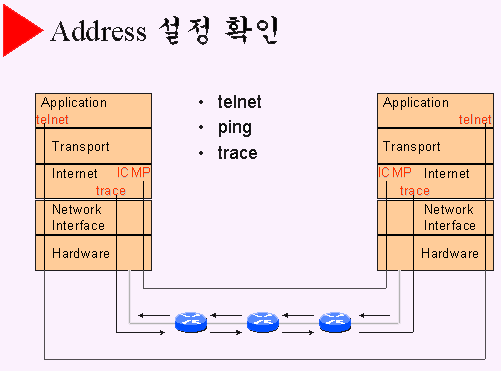
Notes:
- telnet은 application으로 상대측으로 login할 수 있는 기능이다. 연결이 정상적으로 되었다면 login prompt를 만나게 될 것이다.
- 라우터A에서 라우터B를 login할때
- rouerA>telnet 130.120.0.2
- ping은 ICMP를 이용하는 기능으로 연결이 정상적으로 되어 있을때 상대측으로 echo 신호를 보내면 상대측은 echo reply 신호를 보내준다.
- 라우터A에서 라우터B를 ping할때
- ping에는 simple ping과 extended ping이 있음
- trace는 경유하는 시스템들에 대한 정보를 출력해주는 기능으로 어느 시스템까지 정상적으로 연결이 되어 있는지에 대한 정보를 보여주는 중요한 기능이다.
- 라우터A에서 라우터B를 trace할때
- routerA>trace 130.120.0.2
|
